USB 3.0 Device is Recognized as USB 2.0 on a Dell Computer
Summary: Learn how to resolve a USB 3.0 device recognized as USB 2.0 device on a Dell computer.
Αυτό το άρθρο ισχύει για
Αυτό το άρθρο δεν ισχύει για
Αυτό το άρθρο δεν συνδέεται με κάποιο συγκεκριμένο προϊόν.
Δεν προσδιορίζονται όλες οι εκδόσεις προϊόντων σε αυτό το άρθρο.
Symptoms
Plugging in a USB 3.0 device may cause an error message to be displayed or it may not be recognized at all.
The error message may appear stating "This USB device can transfer information faster if you connect it to a Super-Speed USB 3.0 port." This may occur even though it is plugged into a 3.0 port. The blue plastic insert in each port typically identifies USB 3.0 ports on Dell computers.
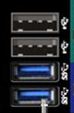
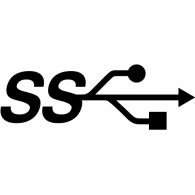
Note: It is not a requirement to have blue plastic inserts to distinguish USB 3.0 ports. With new computers the USB 3.0 ports may have standard black plastic inserts, but they still have the USB 3.0 logo located beside the port. When the computer has a mixture of USB 2.0 and USB 3.0, it is more likely that the USB 3.0 is called out with blue inserts.
Cause
When a USB 3.0 device is plugged in slowly to a USB 3.0 port, it is expected behavior of the hardware to recognize as USB 2.0.
Resolution
If the above error is seen try the following steps to resolve:
- Verify that the device that you are using supports USB 3.0. See the documentation of the USB device for more information.
- Plug the USB 3.0 device again and avoid inserting the device slowly.
- If the above steps do not resolve the issue, reference How to Troubleshoot USB Port When it is Not Working.
Επηρεαζόμενα προϊόντα
Alienware, Inspiron, OptiPlex, Vostro, XPS, G Series, G Series, Alienware, Inspiron, Latitude, Vostro, XPS, Fixed Workstations, Mobile WorkstationsΙδιότητες άρθρου
Article Number: 000135207
Article Type: Solution
Τελευταία τροποποίηση: 22 Ιουλ 2025
Version: 12
Βρείτε απαντήσεις στις ερωτήσεις σας από άλλους χρήστες της Dell
Υπηρεσίες υποστήριξης
Ελέγξτε αν η συσκευή σας καλύπτεται από τις Υπηρεσίες υποστήριξης.